
History & undo
Undo while you edit
Ctrl Z undoes your last change in the editor; Ctrl Shift Z (or Ctrl Y) redoes it. A note at the bottom tells you what was undone and where – Undone: Title (EN) · Villa Marea · General – with a button to redo it.
Typing in one field counts as one step. Undo works in the object editor, the page settings and the content editor.
History
An item's saved versions are in its Activity tab, under Saved versions (an item without activity has a History tab instead). It lists the last 20 saves – who saved, when, and the version note.
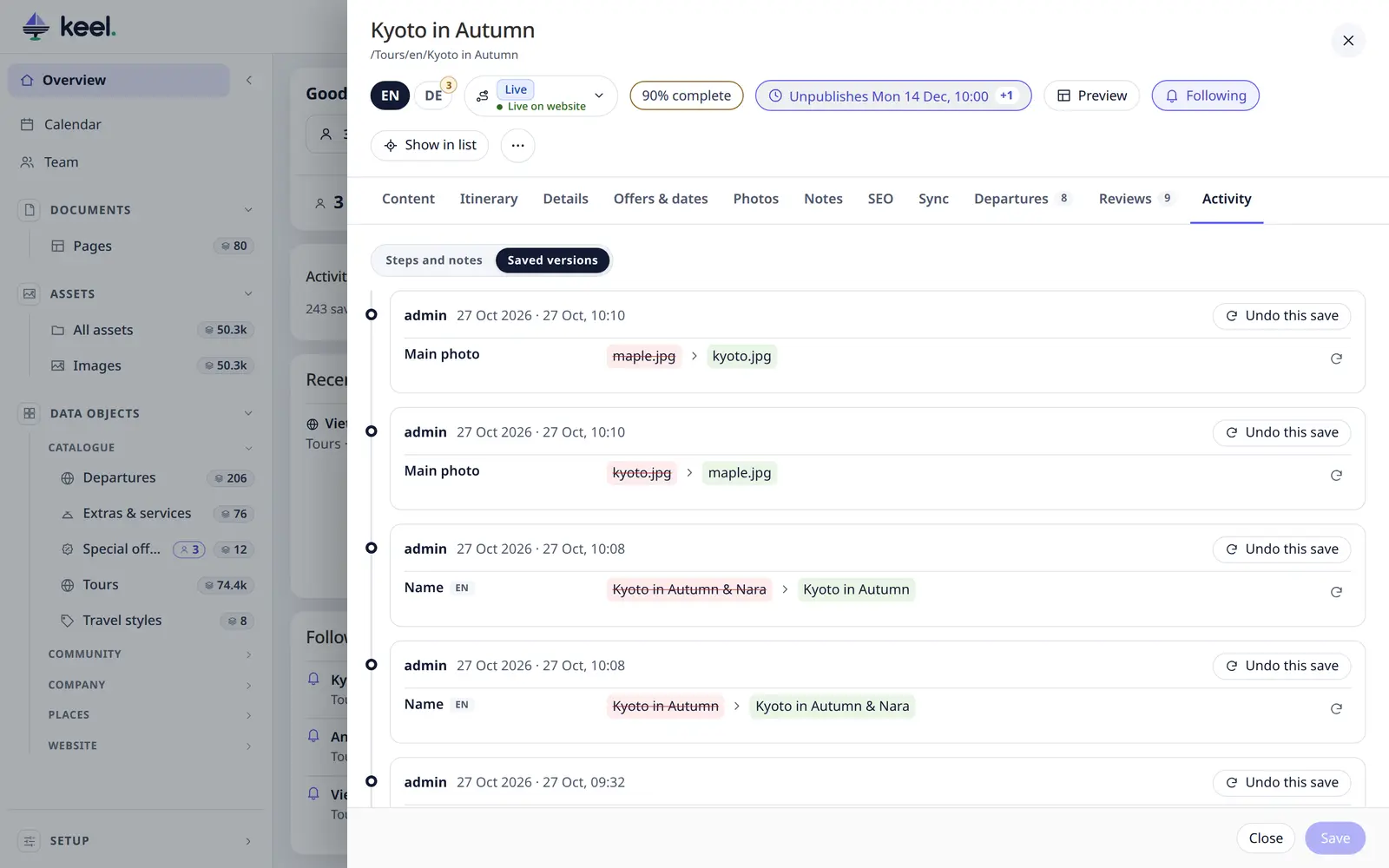
Each save shows what changed, before → after, field by field and per language. Bricks and attributes list each brick field and attribute on its own row.
- Restore previous value puts one field back.
- Undo this save puts back everything that save changed.
Both are saved straight away – and can be undone the same way. Saves made by imports or syncs show as System (import / sync).
Pimcore keeps older saves too, in Pimcore's own version history of the item.
All changes – Setup → History
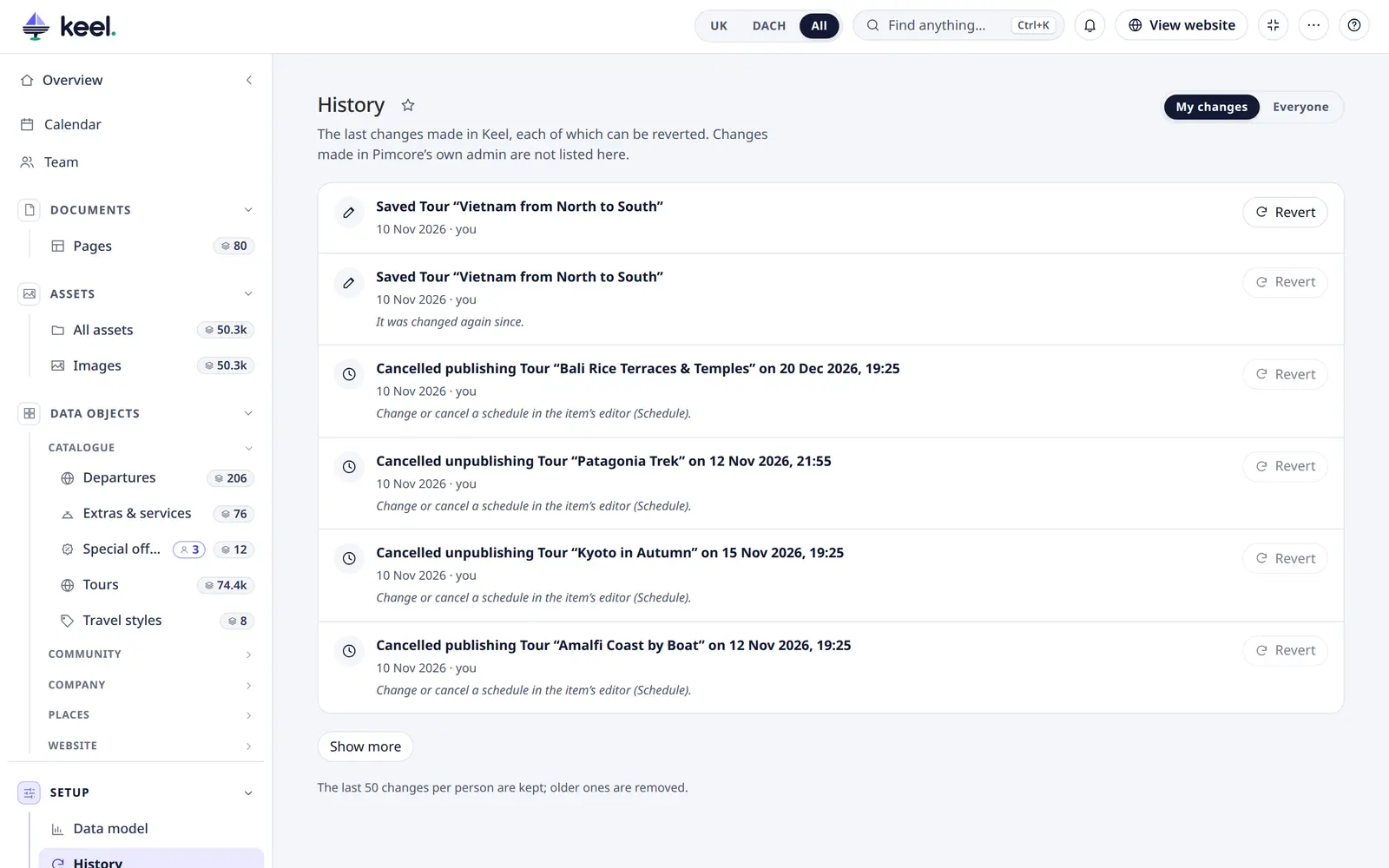
Setup → History in the menu lists the last changes made in Keel across the whole site, newest first, ten at a time with Show more. The page is in Pimcore Studio; the classic admin does not have it.
- My changes shows your own changes. Everyone shows everyone's, but only changes to items you may view. An item
you may not view shows as
#id. - A line says what happened, when and who: saves, status changes, bulk changes, assignments, deleted items and files, moved files, and schedules set or cancelled. A whole bulk job is one line.
- Changes made in Pimcore's own admin, imports and scripts are not listed.
- Keel keeps the last 50 changes per person (
history.keep); older ones are removed.
Revert
Revert undoes a change, after asking first:
| Change | What Revert does |
|---|---|
| Save, status change, bulk change | Each item goes back to its version from before the change. That is saved as a new version, so nothing is lost. |
| Assignment | Each item gets its previous assignee back, or none. |
| Delete | The item or file comes back from Pimcore's recycle bin, into the folder it was in. |
| Move | The files go back to the folder they came from. |
- Keel checks every item with your rights. Items that were changed again since, or that you may not change, are skipped, and the message says so.
- When nothing can be reverted, the button is off and the line gives the reason, for example It was changed again since. or It is no longer in the recycle bin.
- A revert is a new line (Undid: …) and can be reverted too. Only a restored item cannot: delete it again instead. A schedule cannot be reverted here either: change or cancel it in the item's editor (⋯ → Schedule…). A workflow step cannot be reverted here: run another step of the workflow in the item.
- A revert of up to 100 items is done at once. A bigger one runs as a bulk job on the server: its card shows the progress, and its report lists what was skipped. You can leave the page meanwhile.
- Of a very big change, the first 5,000 items can be reverted.